
Remote Access
AgentsView binds to 127.0.0.1 by default, so only your local
machine can reach it. To make the UI available from other devices,
you need to do two things:
- listen on a non-loopback address or put the server behind a proxy
- require a bearer token for API access
In current releases, bearer-token auth is controlled by
require_auth.
Quick Setup
Enable auth in ~/.agentsview/config.toml:
require_auth = trueThen start the server on a non-loopback interface:
agentsview serve --host 0.0.0.0When auth is enabled, AgentsView generates a token if needed and prints it on startup:
Auth enabled. Token: <token>Open http://<your-ip>:8080 from another device and configure the
token in the frontend, or send it in an Authorization header.
Authentication
When require_auth is enabled, all /api/ requests must include:
Authorization: Bearer <token>The token is stored in config.toml as auth_token. It is
generated automatically the first time auth is enabled, so you do
not need to mint one manually.
Auth is enforced on API routes, not on static assets. That means a
browser can load the HTML shell, but API requests fail with 401
until the correct token is supplied.
When require_auth is disabled, normal local loopback use remains
ungated.
SSE Endpoints
The SSE endpoints also accept ?token=<token> because browser
EventSource cannot set custom headers:
http://<host>:8080/api/v1/events?token=<token>http://<host>:8080/api/v1/sessions/<id>/watch?token=<token>Use header-based auth for normal API calls whenever possible.
Public URL And Trusted Origins
When you access AgentsView through a hostname or reverse proxy, tell the server about the public URL:
agentsview serve --public-url https://agents.example.comFor additional trusted origins, use --public-origin:
agentsview serve \ --public-origin https://agents.example.com \ --public-origin https://internal.example.comFlags can also be comma-separated:
agentsview serve --public-origin https://a.example.com,https://b.example.comThese can also be persisted:
public_url = "https://agents.example.com"public_origins = [ "https://agents.example.com", "https://internal.example.com",]Managed Caddy Mode
AgentsView can manage a Caddy reverse proxy for TLS-terminated access. The AgentsView backend stays on loopback while Caddy handles the public socket.
agentsview serve \ --public-url https://agents.example.com \ --proxy caddy \ --tls-cert /path/to/cert.pem \ --tls-key /path/to/key.pem| Flag | Default | Description |
|---|---|---|
--proxy | Proxy mode — currently caddy | |
--caddy-bin | caddy | Path to the Caddy binary |
--proxy-bind-host | 127.0.0.1 | Interface for Caddy to bind |
--public-port | 8443 | External port for the public URL |
--tls-cert | TLS certificate file path | |
--tls-key | TLS key file path | |
--allowed-subnet | Client CIDR allowlist (repeatable or comma-separated) |
Caddy must already be installed and available on PATH unless you
override it with --caddy-bin.
Subnet Allowlists
When using a non-loopback bind host for Caddy, restrict access to
specific networks. Subnet allowlists complement bearer-token auth
rather than replacing it — require_auth = true should still be
set before binding Caddy off loopback.
agentsview serve \ --proxy caddy \ --proxy-bind-host 0.0.0.0 \ --allowed-subnet 192.168.1.0/24 \ --allowed-subnet 10.0.0.0/8Requests from outside the allowed subnets receive 403.
Settings Page
Remote access can also be configured from the Settings page. The Remote Access section lets you:
- toggle
require_auth - view the auto-generated auth token
- connect the frontend to another AgentsView server by URL and token
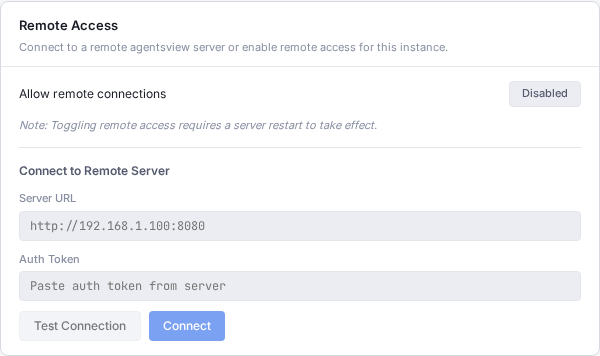
Changes that affect bind or auth behavior may require a server restart.
CLI Flags Reference
| Flag | Default | Description |
|---|---|---|
--host | 127.0.0.1 | Interface to bind |
--public-url | Public URL for hostname or proxy access | |
--public-origin | Trusted browser origin (repeatable/comma-separated) | |
--proxy | Managed proxy mode (caddy) | |
--caddy-bin | caddy | Caddy binary path |
--proxy-bind-host | 127.0.0.1 | Interface for managed proxy |
--public-port | 8443 | External port for managed proxy |
--tls-cert | TLS certificate path | |
--tls-key | TLS key path | |
--allowed-subnet | Client CIDR allowlist (repeatable/comma-separated) |
Config File Reference
Remote-access-related fields in ~/.agentsview/config.toml:
require_auth = trueauth_token = "auto-generated-base64-token"public_url = "https://agents.example.com"public_origins = ["https://agents.example.com"]
[proxy]mode = "caddy"bin = "caddy"bind_host = "127.0.0.1"public_port = 8443tls_cert = "/path/to/cert.pem"tls_key = "/path/to/key.pem"allowed_subnets = ["192.168.1.0/24"]| Field | Description |
|---|---|
require_auth | Require bearer-token authentication for API access |
auth_token | Auto-generated 256-bit bearer token |
public_url | Public URL for host/origin validation |
public_origins | Additional trusted CORS origins |
proxy.mode | Managed proxy mode (caddy) |
proxy.bin | Path to proxy binary |
proxy.bind_host | Interface for proxy to bind |
proxy.public_port | External port for proxy |
proxy.tls_cert | TLS certificate path |
proxy.tls_key | TLS key path |
proxy.allowed_subnets | CIDR allowlist for proxy connections |
For LAN access you still need a non-loopback bind such as
agentsview serve --host 0.0.0.0. require_auth controls API
auth; it does not change the bind address by itself.