
PostgreSQL Sync
AgentsView stores sessions locally in SQLite by default. PostgreSQL sync lets you push sessions from one or more machines into a shared PostgreSQL database, then serve a read-only web UI from it — useful for team dashboards or multi-machine setups.
The sync direction is one-way: SQLite to PostgreSQL. Each machine
pushes its own sessions; pg serve reads from the shared database.
Quick Start
1. Configure PostgreSQL
Add a [pg] section to ~/.agentsview/config.toml:
[pg]url = "postgres://user:pass@host:5432/dbname?sslmode=require"machine_name = "my-laptop"The machine_name identifies which machine pushed each session.
It defaults to the system hostname if omitted. It must not be
"local" (reserved for the local SQLite sentinel).
2. Push Sessions
agentsview pg pushThis syncs all local sessions, messages, and tool calls to PostgreSQL. The schema is created automatically on first push.
3. Serve the Dashboard
agentsview pg serveOpens the read-only web UI at http://127.0.0.1:8080, backed
entirely by PostgreSQL. No local SQLite, file watching, or uploads
— just the viewer.
Commands
agentsview pg push
Sync sessions from the local SQLite database to PostgreSQL.
agentsview pg push [-full]| Flag | Default | Description |
|---|---|---|
-full | false | Force full local resync and re-push, bypassing change detection |
Push is on-demand — run it whenever you want to sync. There is no automatic background push.
What happens on push:
- Runs a local sync to pick up any new or modified session files
- Compares local sessions against the PostgreSQL watermark to find what changed since the last push
- Upserts sessions, messages, and tool calls in batches of 50
- Advances the watermark timestamp on success
Incremental pushes use a two-layer fingerprint to skip
unchanged sessions: first, session metadata fields (project,
agent, timestamps, message counts) are compared; then, per-
session message statistics (count, content length sum/max/min,
system message ordinals, tool call counts) are checked against
PostgreSQL. Use -full to bypass both layers and re-push
everything — for example, after a schema reset or when message
content was rewritten in place.
If any sessions fail to push, the watermark is not advanced so they are retried on the next run. The exit code is 1 when any errors occur, 0 otherwise.
agentsview pg status
Show the current sync state.
agentsview pg statusOutput:
Machine: my-laptopLast push: 2026-03-24T10:30:00ZPG sessions: 1842PG messages: 47291| Field | Description |
|---|---|
| Machine | Configured machine name or hostname |
| Last push | Timestamp of last successful push (“never” if no push yet) |
| PG sessions | Total session count in PostgreSQL (all machines) |
| PG messages | Total message count in PostgreSQL (all machines) |
agentsview pg serve
Start a read-only web UI backed by PostgreSQL.
agentsview pg serve [flags]| Flag | Default | Description |
|---|---|---|
-host | 127.0.0.1 | Bind address |
-port | 8080 | Port |
-base-path | URL prefix for reverse-proxy subpath | |
-public-url | Public-facing URL for proxy access | |
-public-origin | Trusted browser origin (repeatable/comma-separated) | |
-public-port | 8443 | External port for managed proxy |
-proxy | Managed proxy mode (caddy) | |
-caddy-bin | caddy | Caddy binary path |
-proxy-bind-host | 0.0.0.0 | Caddy bind address |
-tls-cert | TLS certificate path | |
-tls-key | TLS key path | |
-allowed-subnet | CIDR allowlist (repeatable/comma-separated) |
The server is read-only — uploads, file watching, and local sync are all disabled. Sessions from all machines appear in a single unified view.
On startup, pg serve automatically applies any pending
schema migrations to PostgreSQL, creating new tables and
indexes added in newer AgentsView versions. This removes
the need to run pg push before starting the server after
an upgrade. If the PostgreSQL role is read-only, the
migration is skipped and the server falls back to the
schema compatibility check.
When binding to a non-loopback address, auth is enabled
automatically. A bearer token is generated and printed on
startup. Pass it via Authorization: Bearer <token> header.
The SSE watch endpoint also accepts ?token=<token> as a
query parameter since the EventSource API cannot set custom
headers.
For managed Caddy mode, keep the backend -host on loopback
and use -proxy-bind-host / -public-port to expose the
public listener. The pg serve and normal serve modes keep
separate managed-Caddy state, so both can coexist on one host.
Examples:
# Local development — loopback, no authagentsview pg serve
# Team viewer with managed Caddy and TLSagentsview pg serve \  -proxy caddy \  -public-url https://viewer.example.com \  -public-port 8443 \  -tls-cert /path/to/cert.pem \  -tls-key /path/to/key.pem
# Remote access on a trusted private network (no TLS)# Only use this behind a VPN or on a private LAN —# tokens are sent in cleartext over plain HTTP.agentsview pg serve -host 0.0.0.0 -port 8080
Machine Labels
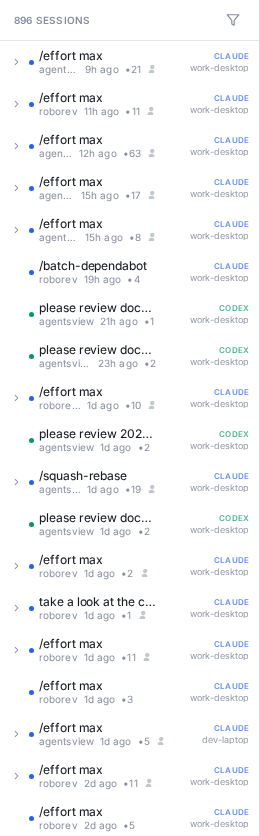
When multiple machines push to the same PostgreSQL database, each session is tagged with its source machine name. In the web UI, session items show a machine label when the session did not originate from the local machine. Use the multi-host filter in the sidebar to show sessions from specific machines.
Configuration
All PostgreSQL settings live in the [pg] section of
~/.agentsview/config.toml:
[pg]url = "postgres://user:pass@host:5432/dbname?sslmode=require"machine_name = "my-laptop"schema = "agentsview"allow_insecure = false| Field | Default | Description |
|---|---|---|
url | (required) | PostgreSQL connection string |
machine_name | OS hostname | Identifies the pushing machine; defaults to os.Hostname() if omitted |
schema | agentsview | PostgreSQL schema name |
allow_insecure | false | Allow non-TLS connections to non-loopback hosts |
The connection string supports standard PostgreSQL parameters.
Use sslmode=require or sslmode=verify-full for remote
databases. Only use sslmode=disable for trusted local
connections.
Environment variables in the URL are expanded using ${VAR}
syntax:
[pg]url = "postgres://${PG_USER}:${PG_PASSWORD}@host:5432/dbname?sslmode=require"Environment Variables
PostgreSQL settings can also be configured via environment
variables, which override config.toml values:
| Variable | Description |
|---|---|
AGENTSVIEW_PG_URL | PostgreSQL connection URL |
AGENTSVIEW_PG_MACHINE | Machine name for push sync |
AGENTSVIEW_PG_SCHEMA | Schema name (default agentsview) |
Multi-Machine Workflow
A typical team setup:
- Each developer configures
[pg]in their localconfig.tomlwith a uniquemachine_name - Each developer runs
agentsview pg pushperiodically (or on a cron schedule) to sync their sessions - One server runs
agentsview pg servepointed at the shared PostgreSQL database - The team opens the shared dashboard to browse everyone’s sessions, filtered by machine if needed
# Developer A's cron (every 30 minutes)*/30 * * * * agentsview pg push
# Team serveragentsview pg serve \  -proxy caddy \  -public-url https://viewer.team.internal \  -tls-cert /etc/certs/viewer.pem \  -tls-key /etc/certs/viewer-key.pem
Limitations
- One-way sync — sessions flow from SQLite to PostgreSQL only. Changes in PostgreSQL do not propagate back to local machines.
- Permanent deletes not propagated — sessions removed via
agentsview pruneare not deleted from PostgreSQL because the local rows no longer exist at push time. Use a direct SQL DELETE to clean up PostgreSQL if needed. Soft-deleted sessions (trash) sync correctly. - Schema compatibility —
pg serveautomatically applies pending schema migrations on startup. If the PostgreSQL role lacks DDL permissions, runagentsview pg pushfrom a machine with write access to update the schema.